I am looking to join a company where my role leverages my experience in developer relations, and full stack javascript experience, on front-end and backend development. The role will focus on mentoring junior engineers in the modern phase of AI assisted workflows, migrate legacy systems to AI assisted systems, create learning resources (docs, tutorials, videos etc) and leverage my BAU work experience in evolving products to increase revenue, improve performance and decoupling for scalability.
Description: A non-profit life drawing community serving as a production environment to validate applied AI architectures, N8N orchestration, and zero-trust networking.
Date: 2010-01-07
Tags: resumeRole
Applied AI & Automation LabFounded 2024 · Hackney, London
Non-profit weekly life drawing community
In 2024, I founded a non-profit life drawing community in London. While the public face is a traditional arts organisation, internally it operates as a rigorous production laboratory for applied AI, system automation, and decoupled architecture.
The community has real operational demands: ticketing, payment processing, marketing orchestration, and customer support. It is not a theoretical sandbox — it runs in production, has a paying user base, and system failures have immediate consequences.
This environment provides a commercial-risk-free proving ground to validate AI-first engineering patterns, migrate legacy workflows to automated pipelines, and test edge infrastructure under real-world loads.
The platform is designed around strict service decoupling. Rather than relying on monolithic platforms or heavy CMS installations, the architecture wires together purpose-built services via clean APIs and orchestration layers. This creates natural system boundaries, allowing individual components or AI models to be swapped or upgraded without cascading risk.
AI & automation (N8N)
Self-hosted infrastructure & zero-trust networking
Edge delivery & headless services
Operational data layer
Operating this stack in production validates theoretical AI patterns against actual operational friction. Key technical learnings include:
The project successfully demonstrates how modern AI orchestration, edge compute, and zero-trust networking can allow a single engineer to reliably operate infrastructure that previously required a dedicated team.
Description: Limited company founder, Head of Studio at a DTP newspaper company, and Internet division lead at a printing company in South Africa.
Date: 2010-01-06
Tags: resumeRole
Founder · Studio Lead · Internet Division HeadLondon & South Africa
Before moving into contract freelancing, I built a commercial career that spanned three distinct roles — each one formative in a different way. Together they gave me grounding in business operations, print production, typography and the earliest commercial applications of the web.
Founded and ran a limited company in London with a team of six. Responsibilities spanned business development, client management, production oversight and studio delivery. Running a small company is a crash course in every discipline simultaneously — sales, operations, people management, cashflow and creative quality all compete for the same bandwidth.
This was the period when the web was transitioning from a curiosity to a commercial channel, and the company evolved with it.
Headed the production studio for a small newspaper DTP company. Responsible for the end-to-end production of print publications — from layout and typography through to pre-press output.
This role built a deep understanding of visual hierarchy, layout discipline and the constraints of production at speed — skills that directly inform my eye for UI/UX detail today. My MA in Graphic Design was earned during this period.
Led the Internet division of a printing company in South Africa, building out their digital offering in the early commercial web era. This was genuine frontier territory — the tools, standards and infrastructure were rudimentary, and most of what was needed had to be figured out from first principles.
It was here that I developed the habit of enjoying problems that can't be solved with a Google search.
Print, publishing and early web share a set of disciplines that transfer directly into modern frontend engineering: typography, visual hierarchy, production at deadline, and communicating clearly with clients about technical constraints. That background is why I have always been as comfortable in design conversations as in engineering ones.
Description: Two decades as a commercial software consultant in London and Barcelona, delivering enterprise platforms and digital experiences for global brands.
Date: 2010-01-05
Tags: resumeRole
Senior Software Consultant**~20 years** · London & Barcelona
Remote, on-site and hybrid contracts
Before transitioning into permanent senior engineering roles, I spent two decades as an independent software consultant across London and Barcelona. Operating concurrently across diverse production environments — from fast-moving digital agencies to heavily gated enterprise delivery teams — provided a broad foundation in software architecture and delivery.
Consulting requires rapid adaptation. You learn to parse unfamiliar codebases in days, translate technical tradeoffs into business impact for stakeholders, and maintain strict standards for code quality under immovable deadlines. This background serves as the bedrock for my current focus on applied AI, automation, and developer experience.
Contracts included engagements at:
Work delivered for household brands including:
Two decades of consulting across dozens of tech stacks ensures I am rarely fazed by legacy systems or architectural debt. I am accustomed to dropping into complex, high-stakes environments and becoming productive immediately. I have navigated every type of engineering culture, from chaotic startups to strict enterprise release cycles, giving me a pragmatic understanding of when to push for perfect architecture and when to ship.
Managing hybrid, cross-border engagements long before remote-first was an industry standard also forged a strong discipline in asynchronous communication and autonomous delivery.
Description: R&D of a real-time screen-sharing Chrome extension for a bespoke remote education platform, using native ES6, WebSocket signalling and WebRTC video streaming on ChromeOS.
Date: 2010-01-04
Tags: resumeRole
Contracted to research and prototype a real-time screen-sharing feature for NetSupport's bespoke remote education platform. The deliverable was a Chrome extension that provided a pseudo-RDP (Remote Desktop Protocol) experience for classroom management on ChromeOS devices.
The project was a focused R&D engagement: assess what was achievable within the Chrome Extension API constraints, design the signalling architecture, and produce a working proof-of-concept.
Chrome Extension architecture
Designed and implemented a Chrome Extension using native ES6 JavaScript, without external frameworks. The extension leveraged the Chrome OS Extension API to capture screen state and stream it in real time — respecting the sandboxed permissions model of the platform.
WebRTC video streaming
Used WebRTC as the video transport layer, establishing peer connections between the teacher console and student devices. Handled ICE candidate negotiation, stream initialisation, and graceful connection teardown within the constraints of the ChromeOS environment.
WebSocket signalling
Built a WebSocket signalling layer to coordinate peer discovery and connection setup between devices on the same network. Designed the message protocol to be minimal, fast, and recoverable on dropped connections.
Research and documentation
Produced technical documentation covering the architecture decisions, limitations of the Chrome Extension API at the time, and a recommended path forward for the production build.
Description: Software engineering on Ably's corporate platform — migrating a legacy Ruby on Rails codebase to React and Tailwind during a full corporate rebrand.
Date: 2010-01-03
Tags: resumeRole
Joined Ably as a senior engineer on the web platform team. The core mandate was ambitious: systematically dismantle a legacy Ruby on Rails view layer, replacing it with a modern React and Tailwind CSS architecture, all while executing a live corporate rebrand.
The engineering culture was rigorous, operating on a default-to-pairing basis. Every pull request required peer review, and comprehensive test coverage was a non-negotiable baseline for merging.
This role established the engineering context for my subsequent lateral move into the Developer Relations team as a Developer Education Engineer.
React and Tailwind migration
Refactored legacy ERB/Rails view templates into modular React components styled with Tailwind CSS. This was a concurrent rebrand and rewrite — requiring close coordination with the design team to implement evolving requirements without compromising the architectural integrity of the new component library.
Documentation platform
Contributed significantly to the developer documentation platform, built on Nanoc and Textile. Focused on the build pipeline architecture, introducing optimisations that improved build times and enhanced the developer experience for the content team.
CMS integrations
Maintained the engineering blog (Ghost) and managed structured marketing content through a Gatsby-based CMS backed by Contentful, ensuring content delivery remained fast and decoupled from the main monolithic application.
Engineering culture
Practised daily paired programming, which served as a forcing function for codebase consistency and rapid knowledge transfer. This collaborative approach significantly reduced onboarding friction for new engineers.
Description: Lateral transfer from engineering to Developer Relations — building JavaScript prototypes as technical content and advocating for real-time edge architecture.
Date: 2010-01-02
Tags: resumeRole
After seven months as a frontend engineer on the core website team, I made a lateral move into Developer Relations. I wanted to apply my engineering background to technical education, translating Ably's complex real-time messaging platform into clear, actionable resources for other developers.
The focus was on developer experience (DX) and education — explaining technical concepts, building working JavaScript prototypes, and advocating for JAMstack and WebSocket architectures through high-quality technical content.
Code as technical content
Engineered prototype JavaScript apps as the primary artefact for developer education. Each demo was a working application demonstrating a specific Ably feature — WebSockets, presence, history, channels, pub/sub — written cleanly enough to serve as the reference implementation for the accompanying documentation.
Developer advocacy and tutorials
Authored developer-facing engineering tutorials anchored to the prototypes. I focused on integrating real-time infrastructure with modern web architectures, including Netlify Functions, Netlify Identity, Netlify Edge Functions, and various static site generators.
Technical concept explanation
Produced technical explainer content to demystify real-time protocols. I authored and presented comprehensive guides on the WebSocket protocol, publish/subscribe messaging patterns, and serverless edge integrations, establishing a standard for Ably's educational materials.
Internal enablement
Codified the technical content production process in internal documentation, ensuring other engineers could reliably produce high-quality tutorials and demonstrations without friction.
Publish & Subscribe with JavaScript and Ably — An explainer of the pub/sub concept followed by a narrated code demonstration building a simple app with the Ably SDK.
The WebSocket Handbook by Ably — A walkthrough of the Ably WebSocket handbook, covering the protocol, use cases, and how Ably builds on top of it.
Building a realtime quiz app with AWS & Ably — A full tutorial walking through building a realtime quiz application using AWS services and the Ably platform.
Description: Re-architecture of legacy video advertising systems across The Times, TalkSPORT and The Sun, delivering major revenue uplifts and setting the standard for AI engineering practice internally.
Date: 2010-01-01
Tags: resumeRole
Senior Software EngineerJune 2023 – present · London
The Times, TalkSPORT, The Sun (all News UK titles)
Joined News UK to work on the shared ad-library serving all brands — The Times, TalkSPORT, The Sun and others. The core role is maintaining and evolving the JavaScript ad-delivery product embedded across mobile and desktop web, responsible for all programmatic and direct advertising revenue.
In addition to the engineering work, I established myself as a principal voice in the internal AI community, leading the adoption of LLM workflow orchestration, agent harnesses, and repository context management.
Active member and presenter in the News UK internal AI community, focusing on applied AI engineering rather than theoretical concepts. Contributions include:
fzfast, an AI CLI tool for fast file-finding, designed to reduce context window pollution and token costs in agentic workflows.Date: 2021-04-13
A Ruby experiment that renders MP3 audiobooks from markdown articles using Google Speech API and Wavenet voices. Web Components power the story selection interface.
Date: 2021-04-13
Use the Chrome extension API to inject a modern UI layer over any legacy ASCII interface — a lightweight approach to enhancing user experience without touching the underlying source.
Date: 2021-04-13
Perlin noise terrain wrapped in both axes with dynamically injected artifacts, giving an infinite impression. Built in PHP and connected to the Instagram API for live content.
Date: 2020-10-23
An ultra-minimal UI that streams huge SVG images over WebSockets — the sketch recreates in real time, line by line, with zero wait. Node.js server hosted on Heroku.
Date: 2021-04-13
Using Blender's Python console to trace chaos algorithms as 3D splines, then converting each spline into a smooth geometry mesh. Pure maths, rendered physical.
Date: 2026-08-31
How to use Netlify Identity and serverless functions to issue Ably JWT tokens to verified users only — keeping your Ably API key hidden and bad actors locked out.
Date: 2021-07-17
A pure CSS parallax effect with minimal scaffolding and zero JavaScript — demonstrated live on CodePen. Simple to drop into any lightweight static site.
Date: 2020-10-23
BASH remote control for the Raspberry Pi Zero camera — JavaScript WebSocket UI with configurable settings and Sunrise/Sunset synchronisation for automated timelapse photography.
Description: Public WhatsApp groups attract spam and bad actors. I replaced ours with an n8n pipeline and a siloed AI chatbot — zero moderation, automatic email escalation when confidence drops.
Date: 2026-08-31
We had a WhatsApp group for lifedrawing.art. It was supposed to be for attendees to ask questions — is the session on this week, what should I bring, where exactly is the venue. Instead it became a part-time moderation job. Spam. Soliciting messages. Promotional posts from people who had never attended. The group number was public-facing and it attracted exactly the people you'd expect.
The moderation overhead was real and it was mine. I killed the group and built a replacement.
A WhatsApp group isn't one thing. It's:
I was only solving problem 1. Questions like "do I need to bring my own easel?" or "is there a session on Bank Holiday Monday?" have definitive answers. They don't need a human. They need a retrieval system with access to the right content.
Problems 2 and 3 I solved differently — email newsletters via Mailchimp for notifications, a Slack workspace for community. Neither involves a public-facing phone number.
n8n is a self-hosted workflow automation tool — think Zapier but open source, running on your own infrastructure, with proper code nodes when you need them. I run it on a VPS via a Cloudflare Tunnel so it's accessible without exposing the host.
The chatbot pipeline: Trigger → Classification → Retrieval → Generation → Confidence check → Response or Escalation
A webhook. I publish a simple web form on the lifedrawing.art site — a text input, a submit button. The form posts to the n8n webhook endpoint. No phone number. No WhatsApp. Anyone with questions uses the form.
The first AI step classifies the question into one of five categories: booking, venue, what-to-bring, model-info, other. I use Claude Haiku — it's a routing task, cheap and fast. The category determines which knowledge source gets retrieved next.
Each category has a corresponding text file — hand-written, kept in a GitHub repo, updated when anything changes. Booking questions get the booking FAQ. Venue questions get the address, transport links, parking info. No vector database. No embeddings. Just the right file for the right question.
This is a deliberate simplification. The knowledge base is small and stable. Full RAG infrastructure would be engineering for its own sake.
Claude Sonnet takes the retrieved content and the original question and generates a conversational response. The system prompt is explicit: answer only from the provided content, do not speculate, do not invent details. If the content doesn't contain the answer, say so.
The prompt also includes the current date and session schedule — injected by n8n from a Google Sheet I update weekly. Sonnet can answer "is there a session this Thursday?" correctly because it has the actual schedule.
Before sending the response, a second AI call (Haiku) evaluates the generated answer against the retrieved content: does this response accurately reflect the source material? It returns a confidence score and a flag: CONFIDENT or UNCERTAIN.
UNCERTAIN triggers escalation.
When confidence is low, the pipeline doesn't send the generated response. It sends me an email with the original question, the generated response, the confidence flag and reasoning, and a reply link. I reply manually. The failure mode is a human — not a confident hallucination.
My initial retrieval step returned the entire FAQ document regardless of category, so the generation step had a lot of irrelevant material to ignore. Sonnet handled it fine but response latency was worse and answers were occasionally unfocused.
Splitting by category and returning only the relevant section cut context to roughly 400 tokens. Response time dropped noticeably. Answers got more precise.
The system handles 40–60 questions per month. Not high volume, but every one of those would have been a notification on my personal phone, often at 11pm.
Building this forced me to write a proper FAQ. Not a vague "here's some info" page but a structured document with explicit questions and explicit answers. That document is now more useful than the chatbot — it's directly searchable on the site and it's what the AI answers from.
The AI didn't replace the knowledge. It made having well-organised knowledge more worthwhile.
The n8n pipeline runs on a £6/month VPS behind a Cloudflare Tunnel. Total infrastructure cost: under £10/month.
Date: 2020-10-23
i3 is my preferred window manager — a lock screen that uses OpenCV and numpy to slice the desktop into animated strips. Developed with iPython, aka Jupyter notebook.
Date: 2021-04-13
Tic-tac-toe with a twist — a multilayer tactical game where players rotate the 3D matrix using Rubik's cube strategy. Built with BabylonJS, React, Redux and ES6.
Description: Engineers have preferred tools, how can we ensure these different AI systems share the most important context? A unified harness built on the AGENT.md convention.
Date: 2026-10-03
TL;DR: Engineers all have their preferred AI tools—some swear by Cursor, others use Claude Code, Copilot, or Aider. How can we design a repository so that no matter which tool a developer brings to the codebase, they all share the same critical context, guardrails, and custom capabilities? The answer is the "AI-Readable Repository" built on the AGENT.md convention and the Model Context Protocol (MCP).
If you're building software in 2026, you aren't just writing code anymore. You're an engineering manager for a diverse, highly capable, but easily confused team of AI agents.
In my project, lifedrawing.art, I recently realized I was suffering from severe AI Tool Fatigue. I had GitHub Copilot acting as my junior dev in the IDE, Claude Code running CLI refactors, and Google Antigravity (AGY) orchestrating complex, multi-agent database migrations.
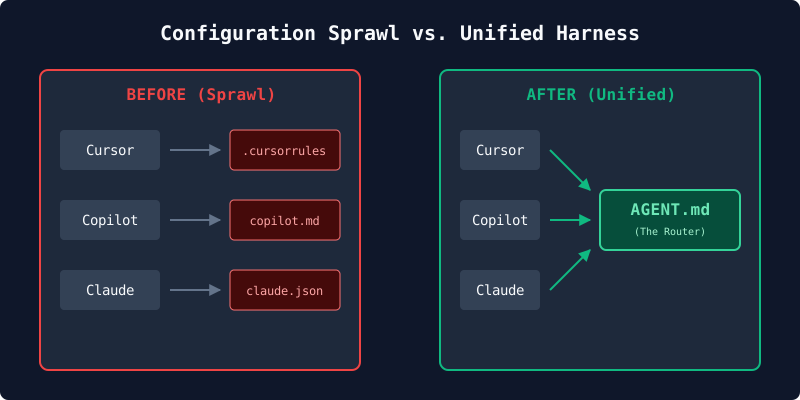
The problem? Configuration sprawl.
My repo was littered with .cursorrules, .github/copilot-instructions.md, .claude/settings.local.json, and .agents/SYSTEM_DIRECTIVE_GLOBAL.md. Every time my architectural standards changed, I had to update four different rule files.
Here is how I am redesigning my repository to have a single, unified "AI Harness" that any tool—Claude, Aider, Cursor, or AGY—can plug into and share the exact same brain.
.airc (The .bashrc for AI)Just like .bashrc or .zshrc sets up your environment variables, aliases, and $PATH regardless of whether you open iTerm, VS Code's terminal, or SSH into a server—you need an initialization file that configures the AI's "environment" regardless of which LLM or IDE is booting up.
Let's call this the .airc (AI Run Control) file. Here is how that analogy maps perfectly to building a unified harness:
export PATH=... (Shared Tools): In .bashrc, you tell the shell where your tools live. In .airc, you define your MCP (Model Context Protocol) servers, telling the AI: "Here is your PATH to my custom tools. If you need to search the database, the executable is at this local port."source ~/.aliases (Shared Rules): In .bashrc, you source external files to keep things clean. In .airc, you source your context, essentially telling the AI: "Read .ai/guardrails.md for security rules, and .ai/architecture.md for our tech stack conventions.".airc does the same: "You are working on lifedrawing.art. Fetch the current open task from the MCP state server before proceeding."Because there isn't a POSIX standard for AI yet, every tool still looks for its own specific boot file. So how do we actually connect them?
When you first try to solve this DRY (Don't Repeat Yourself) problem, your engineer brain will immediately suggest lateral thinking: Symlinks.
Why not just write your rules in a master file, and then hard-symlink it to the proprietary tools?
ln -s .ai/rc.md .cursorrules
Conceptually, it’s beautiful. Absolute zero-duplication at the filesystem level. But in the real world, it's a trap. Here is why you must disqualify it:
.mdc) files. Claude Code looks for JSON files. If you try to point them all to a master folder using symlinks, Cursor will choke on your Python scripts, and AGY will crash trying to execute Markdown files..cursorrules, the IDE will blindly force those 3,000 tokens of context into every single prompt you type, driving up API costs and diluting the AI's attention.AGENT.md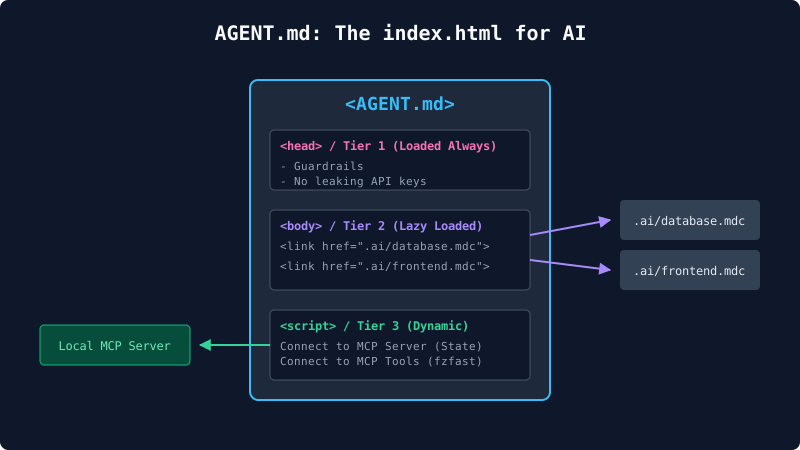
To solve this practically, a new standard is emerging in the community: the AGENT.md convention.
When a human developer joins your project, the first thing they read is the README.md. It’s the front door. But for web developers, a better metaphor is index.html. Just as a web server defaults to index.html to know where to load stylesheets and scripts, an AI defaults to AGENT.md. It acts as the physical .airc file for your repo.
To implement this, you hollow out .cursorrules, .github/copilot-instructions.md, and all your other proprietary configs, and replace them with a single text instruction (a "Pointer"):
"You are an AI agent in the repo. You must read
AGENT.mdbefore executing human prompts."
AGENT.md prevents hallucinations)You don't put your entire codebase's documentation inside AGENT.md (that would trigger the Token Tax mentioned above). Instead, AGENT.md acts as a Dispatcher. It tells the AI where to look based on what it is doing, using a concept called Context Tiering:
AGENT.md so the LLM physically cannot ignore them.AGENT.md gives the AI a map: "If you are writing CSS, go read .ai/frontend-rules.md. If you are writing SQL, go read .ai/database.md." The AI only fetches this context when it actually needs it.By using AGENT.md as your router, a human can open the root of your project and instantly understand exactly what constraints the AI is operating under.
One of my biggest bottlenecks was inter-agent communication. I had agents coordinating 40-step database migrations by reading and checking off boxes in a plan.md file.
This works for a solo dev on a weekend, but at enterprise scale, it's a nightmare. Markdown is human-readable, but it's a terrible database for autonomous agents. Concurrent agents will create Git merge conflicts on a markdown table.
The Fix: Wrap your project state in an MCP Server.
Instead of writing to plan.md, connect your agents to a remote source of truth. Run a lightweight local MCP server that interfaces with Linear, Jira, or GitHub Issues.
When Claude or Antigravity needs to know what to do next, they call an MCP tool: get_current_tasks(). When they finish, they call mark_task_complete(taskId).
Because Claude, Cursor, and AGY all natively support MCP, they can now safely read and write to the same state machine without markdown collisions. They see the exact same Kanban board the human team sees.
I wrote a highly specialized Python script called fzfast to help my AI refactor large amounts of code without blowing up its token limit. Initially, this was locked inside my Antigravity .agents/skills/ folder. Copilot and Claude couldn't use it.
To consolidate, you must decouple your AI "skills" from the IDE that runs them.
The modern way to do this is, again, MCP. By wrapping your custom Python scripts or Bash utilities in a standard stdio MCP server, you expose them universally. Add the MCP server to Claude, Cursor, and AGY, and every AI tool on your machine instantly gains the ability to use your custom-built fzfast refactor logic.
Exposing tools via MCP isn't just about sharing code; it's a profound security boundary.
If your AI needs to run a database query, you don't put the database password in the system prompt. You put the password in the local MCP server environment. The AI asks the MCP tool to run the query, and the MCP server executes it securely on the host machine. Secrets never enter the LLM's context window.
If you are moving this framework from a solo project to a multi-developer enterprise environment, you will hit four critical edge cases. A Senior Engineer review of this architecture revealed the following necessary additions to your AGENT.md:
main. You must add a Tier 1 Guardrail explicitly commanding the agent to run git branch --show-current before modifying code..ai/ documentation grows, instructing the agent to "read .ai/02-architecture.md" will eventually trigger massive context-window bloat. Agents must be instructed to use grep or semantic search to extract only relevant sections.We spend so much time making code readable for humans. The next era of software engineering is making repositories readable for AI.
A unified AI harness isn't about picking the "best" AI tool. It’s about structuring your repository so that any AI tool can drop in, read the context via AGENT.md, execute a standard set of custom tools via MCP, and push code safely without breaking your guardrails.
Consolidate your context. Implement Context Tiering. Adopt MCP for state and skills. Your robot team will thank you.
For those reading this as part of a portfolio or hiring conversation, a quick reality check on framing:
This framework is an exercise in lateral thinking, personal tooling, and R&D exploration. It is meant to provoke inquiry into the future of Developer Experience (DevEx), much like a Developer Advocate exploring the bleeding edge of a new paradigm.
It is not a dogmatic mandate, nor is it a deal-maker/breaker for how a team must operate.
In the real world, it is dangerously easy to fall into the trap of "Yak Shaving"—spending 40 hours building a sprawling AI harness just to save 4 hours of coding. Engineering managers rightfully loathe process for the sake of process.
I built this experimental harness out of personal curiosity and necessity while solo-developing a production marketplace (lifedrawing.art). The goal was never to replace coding with configuration, but to explore how we maintain security boundaries and sanity as our toolchains become increasingly fragmented.
At the end of the day, shipping reliable business value is what matters. This harness is simply an exploration of how we might do that a little more elegantly in the AI era.
Ultimately, this architecture serves as a dynamic sandbox. It allows me to rapidly test and adopt emerging AI tools (like Aider, OpenCode, or whatever releases next month) without starting from scratch. By maintaining a common, trusted foundation of skills, MCP servers, and guardrails, the switching cost between tools drops to zero. I can evaluate new agents purely on their capabilities, knowing they are instantly safely bound by the repo's established context.
View the Boilerplate Repository on GitHub ➔
Description: A PWA that keeps a pose countdown in perfect sync across every phone and laptop in the room — built for life drawing sessions. No app install. Just a URL.
Date: 2026-08-31
Life drawing sessions run on time. The tutor sets a pose — five minutes, ten minutes, twenty — and everyone in the room draws until the time is called. If you're running the session from a laptop at the front while twenty people are scattered across a church hall with their easels, keeping everyone synchronised is an underrated logistics problem.
The old solution was a kitchen timer. Or shouting.
I run lifedrawing.art out of Hackney. We regularly have 15–25 attendees across a room that isn't always acoustically friendly. The tutor calls time, people at the back don't hear, someone loses count, someone else loses their nerve and stops too early. The rhythm of a session depends on everyone knowing exactly how much time is left.
The obvious fix is a visible display — a countdown on a screen at the front. Except then you need a dedicated screen at the front, someone to manage it, and it only solves the tutor's view problem not the attendees' individual awareness.
A shared countdown is a solved problem in distributed systems. You emit a tick, everyone listening receives it. WebSockets are built exactly for this.
The architecture is deliberately simple:
START event with the target duration and a server timestamp. Clients compute elapsed time locally from that timestamp — no polling, no drift.The tutor opens the same URL on their phone. They tap Start. Every phone in the room counts down together.
No app install. No account. No App Store approval cycle.
I give attendees the URL at the start of the session. They bookmark it if they like. It works offline — the countdown runs in the client once started, so no server is needed until the next pose begins. On iOS it installs as a home screen app if they want it there.
The Web App Manifest is six lines. The Service Worker caches the shell. The whole thing is smaller than a photograph.
The real engineering work was handling reconnection gracefully. Phones go to sleep. Screens lock. Someone's battery dies and comes back. When a client reconnects mid-pose it needs to catch up to the current state immediately without disrupting the room.
The server always holds the canonical state. On CONNECT it sends the current timer state — duration, start timestamp, paused-at timestamp if paused. The client reconstructs the correct elapsed time from those values. No sync message required. No special handshake. The client does the maths.
const elapsed = Date.now() - startTimestamp - totalPausedMs;
const remaining = duration - elapsed;
That's the entire reconnection strategy.
The current implementation uses a single shared room — everyone who visits the URL joins the same session. That worked for one venue. For multiple simultaneous sessions (we occasionally run parallel workshops) I'd add room codes: Nanoid for the room key, a Map on the server, a hash in the URL.
I'd also add a proper accessibility mode — a pulsing background colour as the timer approaches zero, for anyone at the back who can't read the numerals at distance.
It replaced the kitchen timer on the first session I deployed it. No explanation required. The tutor taps start, everyone's phone counts down. When it reaches zero a gentle chime plays — the same AudioContext tone on every device, triggered by the broadcast event, not the client's own timer, so they all sound within milliseconds of each other.
Twenty artists, one shared beat. That's the whole point.
The stopwatch is deployed at lifedrawing.art. Source code available on request.
Description: Pick the right AI model — capability, context, cost per token. Because throwing Opus at a regex is the engineering equivalent of a sledgehammer on a drawing pin.
Date: 2026-08-31
The thing nobody tells you when you start working with AI agents seriously is that model selection is an engineering decision, not a philosophical one. Pick wrong and you're either burning money on a model that's solving the wrong class of problem, or you're watching a cheap model fail on something that needed proper reasoning, and assuming the whole approach doesn't work.
It does work. You just reached for the wrong tool.
I think about model selection across four axes:
Map any task to those four dimensions and the model choice mostly selects itself.
Tier 1: Frontier reasoning (Claude Opus, GPT-4o, Gemini Ultra)
These are for ambiguous, multi-step problems where intermediate reasoning determines correctness. Code refactors that span multiple files. Architectural design questions. Anything where a wrong intermediate step cascades into a structurally broken output.
Cost: significant. Use sparingly and deliberately.
Tier 2: Fast, capable (Claude Sonnet, GPT-4o-mini)
The workhorse tier. Well-structured tasks with clear inputs and outputs. Writing a test suite for known function signatures. Summarising a document into a fixed schema. Drafting copy from a detailed brief. This is where 80% of your actual agent work lives.
Cost: 5–15× cheaper than Tier 1. Use by default.
Tier 3: High-throughput, low-latency (Claude Haiku, GPT-3.5-turbo class)
Classification, routing, slot-filling, extraction from structured text. If the task is "read this input, output one of these five labels", a frontier model is overkill. Haiku will do it faster and for a fraction of the cost.
Cost: 20–50× cheaper than Tier 1. Use for high-volume repetitive subtasks.
The mistake I see most often — including in my own early pipelines — is using a Tier 1 model to handle tasks that belong to Tier 3, because Tier 1 always succeeds and Tier 3 sometimes doesn't.
That's backwards reasoning. The correct response to a Tier 3 model failing on a task is to improve the prompt and the task specification, not to upgrade the model. A well-structured classification prompt that gives Haiku explicit output format constraints, examples, and a fallback category will outperform a vague Opus prompt on the same task — and cost 40× less.
If you can't make a cheaper model succeed with a better prompt, you may genuinely have a Tier 2 or Tier 1 task. But verify that first.
Context window size and model capability are not the same dimension. A 200k context window doesn't mean you need a frontier model — it means you have a lot of input material. Haiku has a large context window. Use it for RAG retrieval tasks where you're providing a big document and asking for extraction. Use Opus only if the extraction requires sophisticated cross-document reasoning.
In practice, most RAG pipelines are retrieval + formatting tasks. Tier 2 or Tier 3. The embeddings are doing the heavy work. The model is doing finishing work.
For lifedrawing.art's n8n-based AI pipelines:
Opus appears nowhere in that pipeline. The task is well-structured and the inputs are known.
Before you pick a model, do the maths. Sonnet at $3/million input tokens vs Opus at $15/million. If your agent handles 10,000 requests per month at an average of 2,000 tokens each:
For many tasks, Sonnet and Opus produce equivalent outputs. That's £190/month in capability you're not using.
The right question is not "which model is best?" It's "which model is sufficient for this task, at this error rate, at this volume?"
Answer that honestly and the decision is mostly arithmetic.
These observations come from running production AI pipelines at lifedrawing.art and from the AI tooling work I presented at the News UK All Hands Engineering Meeting in early 2025.
Description: WATTPAD is a free platform for readers and writers specicically focused on content for the YA (young adult) demographic. It's social media publishing for young writers. The brief was to design three covers that "stood out" on the list page.


Description: A rebranding of a popular crypto currency portfolio tracker. This project included a full overhaul of the user interface, simplification of UI components, SVG iconography and bespoke user journey that illustrates the steps required for a user to add a new investment to their portfolio.


Description: A start-up intending to provide select cryptocurrenies as gift cards, which could be purchsed at any POS vending provider. This project required a full brand identity. This included packaging, merchandise, business cards, the website build and a Kickstarter campaign. The products, packaging and vending stands are 3D renders.


 ## 01 website


Description: Promotional video for an excersice website that intergrated demonstarted the practice of low-impact excersise. This production required multicamera shoot on a white set, editing, colour grading and sourcing 3rd party music.


Description: Instagram promotional video reels. These include pre-launch announcements, and weekly video blog clips the promote and document a life drawing community in London


Description: Full corporate identity design and conceptualisation, fullstack website engineering with PayPal intergration for ticket purchases, email newsletter design and social media content management solution for a small art community in London


Description: Graphic assets used for a corporate blog post that, in addition to the written content, required a hero banner (according to brand guideline), techical illustration and a bespoke colour scheme for syntax highlighting.


Description: Video tutorial published on YouTube that explains to a developer the concept of Publish/Subscribe (PubSub) by using explanitory narrative, and then teaches the user, with a narated code demonstartion, how to create a simple app.


Description: Marketing video to promote a free dowloadable PDF. This project required script writing, directing of voice over, creating all the video assets, 3D rendering and animation.
Description: User interface design for an online multiplayer 3D tactical dominance game which was inspired by a combination of tic-tac-toe and the Rubik cude.


Description: A branded marketing video to promote a free dowloadable PDF. This project required script writing, sourcng and directing talent, audio edit of voice over, creating the video assets, 3D rendering and animation, editing, color correction and delivery.


Description: Bruce Thomas is a senior software engineer based in London, specialising in applied AI, automation, and developer experience.
Hi. My name is Bruce Thomas. I'm a senior software engineer based in London, currently focusing on applied AI, automation, and developer experience.
My career didn't start in AI. For over a decade, I worked deep in the front-end ecosystem, eventually specialising in high-traffic AdTech architectures at News Corporation (The Times, TalkSPORT, The Sun). Over time, I found myself increasingly drawn to developer education and advocacy — teaching modern web development practices and helping teams improve their engineering culture.
As the industry evolved, my focus naturally shifted. The most interesting problems were no longer just about rendering pixels efficiently, but about integrating intelligent systems into everyday developer workflows. This led me from traditional front-end engineering and developer advocacy into applied AI — specifically building agent tooling, RAG architectures, n8n orchestration pipelines, and human-in-the-loop automation.
I'm particularly interested in how we can make AI tools practical and reliable rather than just experimental. Recently, I presented on this topic at the News UK All Hands Engineering Meeting, discussing the day-to-day craft of working with LLMs and designing robust agentic harnesses.
In 2024, I founded lifedrawing.art — a non-profit life drawing community based in Hackney, London. Beyond its real-world purpose, it serves as a live laboratory for my engineering work.
It's the bridge between my front-end background and my current focus on AI-first engineering. Managing a physical event with real attendees, real payments, and real consequences requires reliable systems. I use it to test and deploy emerging technologies before they hit enterprise production. The platform is powered by self-hosted n8n, Gemini AI, Cloudflare Tunnels, Stripe, and Eventbrite APIs — creating a fully automated operational backend that essentially runs the business for me while I'm at my desk job.
I love abstract and arbitrary photographs — in contrast to vanity shots. There are so many fascinating things in the world more interesting than a posed smile.

My lifelong ambition is to write and finish a novel. Over the years I've participated in various writing courses, online competitions and social writing clubs. Some of the stories are published here — the story page is also an experiment in web components.