TL;DR: Engineers all have their preferred AI tools—some swear by Cursor, others use Claude Code, Copilot, or Aider. How can we design a repository so that no matter which tool a developer brings to the codebase, they all share the same critical context, guardrails, and custom capabilities? The answer is the "AI-Readable Repository" built on the AGENT.md convention and the Model Context Protocol (MCP).
If you're building software in 2026, you aren't just writing code anymore. You're an engineering manager for a diverse, highly capable, but easily confused team of AI agents.
In my project, lifedrawing.art, I recently realized I was suffering from severe AI Tool Fatigue. I had GitHub Copilot acting as my junior dev in the IDE, Claude Code running CLI refactors, and Google Antigravity (AGY) orchestrating complex, multi-agent database migrations.
The problem? Configuration sprawl.
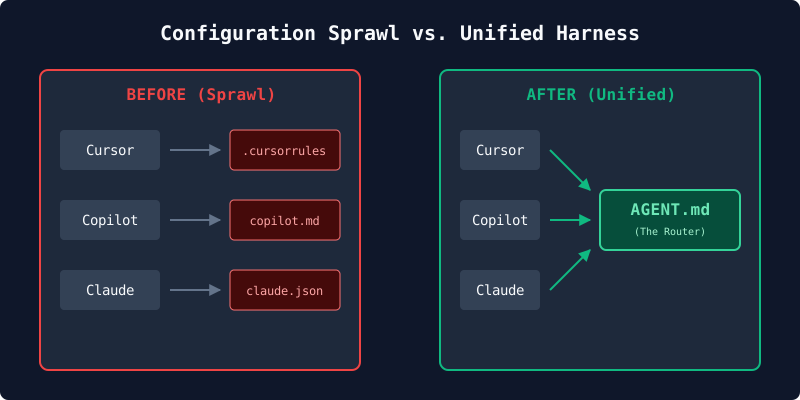
My repo was littered with .cursorrules, .github/copilot-instructions.md, .claude/settings.local.json, and .agents/SYSTEM_DIRECTIVE_GLOBAL.md. Every time my architectural standards changed, I had to update four different rule files.
Here is how I am redesigning my repository to have a single, unified "AI Harness" that any tool—Claude, Aider, Cursor, or AGY—can plug into and share the exact same brain.
The Mental Model: .airc (The .bashrc for AI)
Just like .bashrc or .zshrc sets up your environment variables, aliases, and $PATH regardless of whether you open iTerm, VS Code's terminal, or SSH into a server—you need an initialization file that configures the AI's "environment" regardless of which LLM or IDE is booting up.
Let's call this the .airc (AI Run Control) file. Here is how that analogy maps perfectly to building a unified harness:
export PATH=...(Shared Tools): In.bashrc, you tell the shell where your tools live. In.airc, you define your MCP (Model Context Protocol) servers, telling the AI: "Here is your PATH to my custom tools. If you need to search the database, the executable is at this local port."source ~/.aliases(Shared Rules): In.bashrc, you source external files to keep things clean. In.airc, you source your context, essentially telling the AI: "Read.ai/guardrails.mdfor security rules, and.ai/architecture.mdfor our tech stack conventions."- The MOTD (Shared State): When you open a terminal, it might print the current system load. Your
.aircdoes the same: "You are working on lifedrawing.art. Fetch the current open task from the MCP state server before proceeding."
Because there isn't a POSIX standard for AI yet, every tool still looks for its own specific boot file. So how do we actually connect them?
1. The False Peak: Why Symlinking Isn't the Answer
When you first try to solve this DRY (Don't Repeat Yourself) problem, your engineer brain will immediately suggest lateral thinking: Symlinks.
Why not just write your rules in a master file, and then hard-symlink it to the proprietary tools?
ln -s .ai/rc.md .cursorrules
Conceptually, it’s beautiful. Absolute zero-duplication at the filesystem level. But in the real world, it's a trap. Here is why you must disqualify it:
- Format Pollution: Different tools expect different file structures. Antigravity expects custom skills as Python scripts. Cursor expects Markdown (
.mdc) files. Claude Code looks for JSON files. If you try to point them all to a master folder using symlinks, Cursor will choke on your Python scripts, and AGY will crash trying to execute Markdown files. - The Token Tax: If you symlink a massive master file into
.cursorrules, the IDE will blindly force those 3,000 tokens of context into every single prompt you type, driving up API costs and diluting the AI's attention. - The Windows Git Nightmare: Directory symlinks in Git often break on Windows machines unless specifically configured. If a collaborator clones your repo, the symlinks turn into plain text files containing the path string, completely breaking the AI harness for them.
2. The Practical Solution: Enter AGENT.md
To solve this practically, a new standard is emerging in the community: the AGENT.md convention.
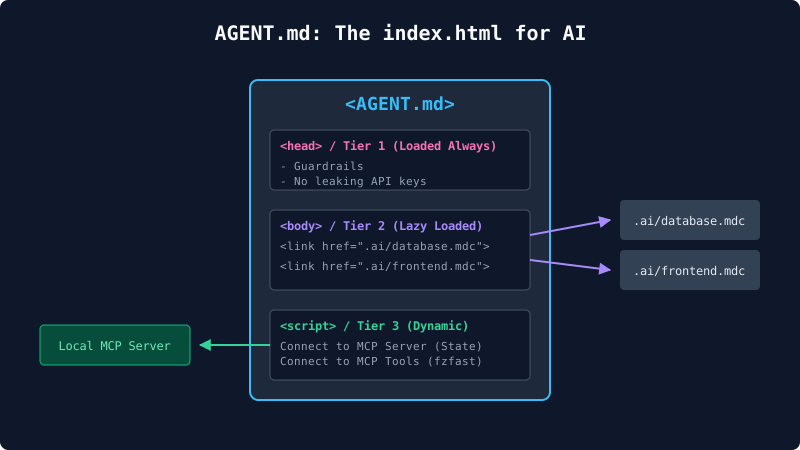
When a human developer joins your project, the first thing they read is the README.md. It’s the front door. But for web developers, a better metaphor is index.html. Just as a web server defaults to index.html to know where to load stylesheets and scripts, an AI defaults to AGENT.md. It acts as the physical .airc file for your repo.
To implement this, you hollow out .cursorrules, .github/copilot-instructions.md, and all your other proprietary configs, and replace them with a single text instruction (a "Pointer"):
"You are an AI agent in the repo. You must read
AGENT.mdbefore executing human prompts."
Context Tiering (How AGENT.md prevents hallucinations)
You don't put your entire codebase's documentation inside AGENT.md (that would trigger the Token Tax mentioned above). Instead, AGENT.md acts as a Dispatcher. It tells the AI where to look based on what it is doing, using a concept called Context Tiering:
- Tier 1 (Global Guardrails): The absolute, non-negotiable rules (e.g., "NEVER expose the database admin key"). These go directly inside
AGENT.mdso the LLM physically cannot ignore them. - Tier 2 (Domain Context): The heavy documentation.
AGENT.mdgives the AI a map: "If you are writing CSS, go read.ai/frontend-rules.md. If you are writing SQL, go read.ai/database.md." The AI only fetches this context when it actually needs it. - Tier 3 (Task State): The current Jira/Linear ticket, which is handled by MCP (see below).
By using AGENT.md as your router, a human can open the root of your project and instantly understand exactly what constraints the AI is operating under.
3. From Markdown State to MCP (Model Context Protocol)
One of my biggest bottlenecks was inter-agent communication. I had agents coordinating 40-step database migrations by reading and checking off boxes in a plan.md file.
This works for a solo dev on a weekend, but at enterprise scale, it's a nightmare. Markdown is human-readable, but it's a terrible database for autonomous agents. Concurrent agents will create Git merge conflicts on a markdown table.
The Fix: Wrap your project state in an MCP Server.
Instead of writing to plan.md, connect your agents to a remote source of truth. Run a lightweight local MCP server that interfaces with Linear, Jira, or GitHub Issues.
When Claude or Antigravity needs to know what to do next, they call an MCP tool: get_current_tasks(). When they finish, they call mark_task_complete(taskId).
Because Claude, Cursor, and AGY all natively support MCP, they can now safely read and write to the same state machine without markdown collisions. They see the exact same Kanban board the human team sees.
4. Skill Portability & Zero-Trust Security
I wrote a highly specialized Python script called fzfast to help my AI refactor large amounts of code without blowing up its token limit. Initially, this was locked inside my Antigravity .agents/skills/ folder. Copilot and Claude couldn't use it.
To consolidate, you must decouple your AI "skills" from the IDE that runs them.
The modern way to do this is, again, MCP. By wrapping your custom Python scripts or Bash utilities in a standard stdio MCP server, you expose them universally. Add the MCP server to Claude, Cursor, and AGY, and every AI tool on your machine instantly gains the ability to use your custom-built fzfast refactor logic.
The Hidden Security Benefit
Exposing tools via MCP isn't just about sharing code; it's a profound security boundary.
If your AI needs to run a database query, you don't put the database password in the system prompt. You put the password in the local MCP server environment. The AI asks the MCP tool to run the query, and the MCP server executes it securely on the host machine. Secrets never enter the LLM's context window.
5. Scaling from Solo to Team (Handling Edge Cases)
If you are moving this framework from a solo project to a multi-developer enterprise environment, you will hit four critical edge cases. A Senior Engineer review of this architecture revealed the following necessary additions to your AGENT.md:
- Git Context Blindness: An overly eager agent might accidentally execute destructive commands on
main. You must add a Tier 1 Guardrail explicitly commanding the agent to rungit branch --show-currentbefore modifying code. - MCP Authentication Leaks: Secrets should stay on the host machine. But if an MCP tool fails due to missing credentials, an agent might hallucinate and ask the user to paste an API key into the chat. You must explicitly instruct agents to halt and prompt the user to configure their local environment variables instead.
- The "Token Tax" Paradox: As your
.ai/documentation grows, instructing the agent to "read.ai/02-architecture.md" will eventually trigger massive context-window bloat. Agents must be instructed to usegrepor semantic search to extract only relevant sections. - Concurrent State Collisions: It is not enough to tell an agent to read a Linear/Jira ticket. In a team environment, two agents might pick up the same ticket simultaneously. You must mandate that agents use MCP tools to explicitly transition ticket state to "In Progress" before writing code.
The End Goal: The AI-Readable Repository
We spend so much time making code readable for humans. The next era of software engineering is making repositories readable for AI.
A unified AI harness isn't about picking the "best" AI tool. It’s about structuring your repository so that any AI tool can drop in, read the context via AGENT.md, execute a standard set of custom tools via MCP, and push code safely without breaking your guardrails.
Consolidate your context. Implement Context Tiering. Adopt MCP for state and skills. Your robot team will thank you.
Appendix: A Note on Framing & Pragmatism
For those reading this as part of a portfolio or hiring conversation, a quick reality check on framing:
This framework is an exercise in lateral thinking, personal tooling, and R&D exploration. It is meant to provoke inquiry into the future of Developer Experience (DevEx), much like a Developer Advocate exploring the bleeding edge of a new paradigm.
It is not a dogmatic mandate, nor is it a deal-maker/breaker for how a team must operate.
In the real world, it is dangerously easy to fall into the trap of "Yak Shaving"—spending 40 hours building a sprawling AI harness just to save 4 hours of coding. Engineering managers rightfully loathe process for the sake of process.
I built this experimental harness out of personal curiosity and necessity while solo-developing a production marketplace (lifedrawing.art). The goal was never to replace coding with configuration, but to explore how we maintain security boundaries and sanity as our toolchains become increasingly fragmented.
At the end of the day, shipping reliable business value is what matters. This harness is simply an exploration of how we might do that a little more elegantly in the AI era.
Ultimately, this architecture serves as a dynamic sandbox. It allows me to rapidly test and adopt emerging AI tools (like Aider, OpenCode, or whatever releases next month) without starting from scratch. By maintaining a common, trusted foundation of skills, MCP servers, and guardrails, the switching cost between tools drops to zero. I can evaluate new agents purely on their capabilities, knowing they are instantly safely bound by the repo's established context.